September 28, 2025 Opinion No comments
Talk Is Cheap; The Smallest Code Change Speaks Loudest
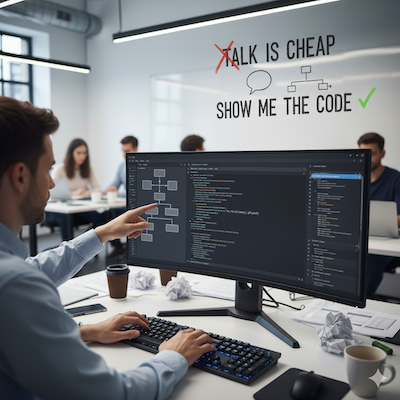
How many times have you been in a meeting where a brilliant idea was discussed, only to have it disappear into thin air? “Talk is Cheap; Show me the code” by Linus Torvalds perfectly captures the frustration, which roughly means that ideas, promises, or arguments don’t carry much weight until they’re backed by action. In software, the ultimate proof is working code. To be brutally honest, I often talk more than I code, and while talking is important at more senior roles, the ultimate delivery is still code.
From “Wouldn’t It Be Nice” to “I Did It”
I have been in multiple discussions where we were talking about some tool or some product and we all thought, “oh, it would have been nice if the tool had this capability or just this extra command flag we can use”, but because none of us had familiarity with the tool it basically stayed with that “would have been nice”. Over time I noticed: diving into the code is usually less intimidating than it looks. Once you do, you not only solve the problem but also gain familiarity others don’t have.
Why don’t people do this more often? It’s simple: it requires effort taking time away from your main project and has a high risk of failure. My proposal is to time-box your effort. There is definitely a sweet spot where you can spend y hours on the thing, where uncertainty reduces the most drastically, to make the final call if more effort is worth it. The ‘y’ should be somewhat proportional but limiting to the benefit ‘x’ you get, maybe y = sqrt(x).
The Approval Stamp: Reducing Friction
Another example: I was using some internal tool and it had a simple UI validation bug. One path to take was to file a ticket with the team owning the tool, someone would look it up, which would definitely be low priority on their plate, and this would get fixed in few weeks or not at all, but I needed the fix right now to avoid workarounds, so I published the fix code change – literally 2 lines of code. It would have probably taken 2x more time to file the ticket and communicate with the tool owners. They only had to stamp the change.
A bit more abstract: let’s say you are using a system owned by someone else, and you need to change something from x to y. In one way you know that’s a simple change and the person is likely to agree, but explaining it and waiting for them to apply the change causes friction. Instead if you just do the change on your own, and getting Y instead of X is just an “approve” stamp on the other side you will get your stuff really soon.
How about Alignment?
But won’t you come across as someone for pushing for a change without aligning first? – Yup, there is such a risk. There is a very simple way to avoid this: just soften how you propose the change. Ideas: 1) give a quick short “heads-up” message “I have this idea to improve Z by changing x to y, I will share a preview change to show what I mean”; 2) frame your code change as a light proposal, a “preview”, a “suggestion”.
Conquering Uncertainty with Code
This is perhaps where the ‘smallest code change’ provides the most value. Many of us, myself included, can get lost in the abstraction of system design by drawing diagrams and talking through every possibility. While this is a necessary step, it’s not a substitute for engaging with the actual code. I’ve worked with software architects in the past who were so detached from the codebase that their designs were completely unworkable. They simply didn’t know what they were talking about. The solution is to complement your high-level design with ‘on the ground’ code.
The key learning for myself: whenever working on the design of something: do more code digging and make small refactorings along the way (even if a bit unrelated).
Feeling of Doing instead of Talking
This one is a bit subjective, but we are humans as well as software engineers. There’s a fundamental difference between talking about progress and actually making it. Pushing code feels a lot better than just talking about it. Wouldn’t you agree?
Next time you’re tempted to keep talking, try the smallest code change instead. It speaks louder than a hundred conversations. This is one lesson for me.
Conway’s Law Is Bi-Directional: How Teams Shape Systems and Systems Shape Teams
September 20, 2025 Opinion, TeamWork No comments
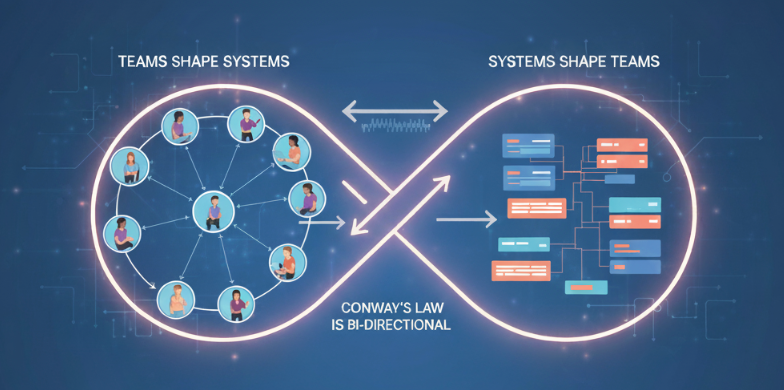
I once worked on a product where two Tech Leads couldn’t agree on direction. The result? Two different UIs for the same set of users. That’s Conway’s Law in action: systems mirrored organizational misalignment.
My personal observations over 17 years in large enterprise companies align with Conway’s. But I also believe this goes deeper. Causality runs both ways: organizations shape systems, and systems reshape organizations. In addition to this I think the technical problems the system is experiencing are reflections of communication dynamics.
Conway’s Law and Examples
A quick reminder of Conway’s Law: “Any organization that designs a system will produce a design whose structure is a copy of the organization’s communication structure.”. There are other variations of this. A simpler one I like to personally use in my conversations could be “Organizations design and build systems that mirror their own communication structure”.
For instance, if the company has extremely autonomous teams/orgs the company may end up in a situation where different systems are built with different tech stack and are fully decoupled but also hard to integrate if needed, but, let’s say if within an individual team/org communication is frequent and multi-directional their system might be tightly coupled and un-modular.
Direction of Causality: Org <=> System
So is it that once you have your organization you will end up with a particular system or is it while you build the system the organizational structure will simply organically mimic it?
That’s an important question and I’m of the opinion that this works both ways, meaning you can do re-orgs which will eventually lead to changes in technical aspects of the system, or you can make and push for design choices that over time will lead to org changes (like creating a team for a sub-module).
Companies sometimes deliberately reorganize teams or how they communicate (“Inverse Conway Maneuver”) to influence product architecture. This is one of the other reasons why re-orgs happen, but probably less frequently.
Take Amazon’s mandate for all of the internal teams to use AWS? I was on one of such teams and had to migrate some of our services to use AWS. This approach allowed Amazon to mimic external communication internally (external companies using AWS => internal teams using AWS). Internal engineers were both users and builders, so AWS could iterate quickly on real pain points. In this way feedback loop was that new communication channel that influenced how the systems evolved.
While Conway’s Law is usually stated as “organizations shape systems,” in practice I’ve seen a feedback loop. As soon as you draw a boundary in code, questions of ownership arise, and soon an organizational boundary emerges. Conversely, when leadership merges teams, systems often collapse back into monoliths or shared modules. Architecture creates new communication needs, which shape team structure, and team structure in turn reinforces or redefines architecture. This is why I argue causality is bi-directional: the system and the organization co-evolve.
When Communication Breaks Down
Communication bottlenecks eventually show up in code. Where teams don’t talk, APIs and integration points often become pain points. One team might be making assumptions about how the system behaves, they built their system based on that assumption and eventually operational issues show up. I personally observed this more frequently in micro-service based architectures, but monolithic systems are also susceptible to this.
Sometimes it takes introducing a liaison or two between two teams/orgs to fix things up. I have been working for one division at IAEA (UN) but was given to work on the project for another division, we were able to successfully integrate systems owned by two divisions. It is not so much just my contribution but rather a good decision to introduce new communication channels which resulted in changes to system integration.
Highly cross-functional teams often produce more rounded, cohesive, end-to-end systems. I’ve been on teams where many different roles were involved and worked very closely together (Meta seems to be very strong at this) as well as on teams where product management, database engineers were working in disconnected mode, producing outputs in sequence, which resulted in delays and systems that didn’t really do what they were supposed to.
Conclusion
Over and over I’ve observed mirroring between systems and communications structures, and I believe the causality is bi-directional, as such you can influence the system not just directly via design but by making organizational changes. The practical lesson is that you don’t always fix a broken system in the codebase alone. Sometimes the fastest path is changing how people talk, or who talks at all.
Vibe Coding AI that learns to play Snake game
September 14, 2025 AI, Uncategorized No comments
Today I’m Vibe Coding something and inviting you to follow along. This is not a very serious post. The purpose of this blog post is just to see how quickly we can build a NN that plays snake game and if we can improve it:

Steps we we will follow:
- Generating simplest snake game you can play with WASD keys.
- Generating AI that learns to play and watch it play.
- Attempt to improve generated code so it reaches better scores.
Step 1: Generating simplest snake game you can play
Obviously, I need to write a prompt to generate such a game, but being lazy (and not knowing too much about IA) I offloaded prompt generation to GPT:
Generate a good prompt for copilot AI in Visual Code so it generates code for the snake game. Snake game can be the simplest possible terminal based game on a small field.The output was pretty reasonable prompt, which I could have written (but, hey, that takes time). The only thing I updated in the prompt was the very last line to keep track of the score of the game:
# Write a simple snake game in Python that runs in the terminal.
# Requirements:
# - Keep the game as simple as possible.
# - Use a small fixed grid (e.g., 10x10).
# - The snake moves automatically in the last chosen direction.
# - Use WASD keys for movement (no fancy key handling needed, blocking input is fine).
# - Place food randomly; eating food makes the snake longer.
# - The game ends if the snake runs into itself or the walls.
# - Print the field after each move using simple ASCII characters:
#   - "." for empty space
#   - "O" for snake body
#   - "X" for snake head
#   - "*" for food
# - Keep the code in a single file, no external libraries beyond Python standard library.
# - Keep it short and readable.
# - Keep the score of the game. The score equals the total number of food eaten.
The generated code (with gpt-4o) was 73 lines of code and I could play the game in the terminal: https://github.com/andriybuday/snake-ia/blob/main/snake_game.py
Step 2: Generating AI that learns to play and watching it play
Again, prompt to get the prompt:
Now we need another prompt. This time we want to use pytorch and will be building a simple 2 hidden layers neural network with reinforcement learning. Use large punishment for loosing the game and small rewards for each eaten food. We want to achieve quick learning without too many iterations.
The prompt it generated this time was much more extensive. Here are all of the prompts: https://github.com/andriybuday/snake-ia/blob/main/README.md I then fed that prompt to both GPT-4o and Claude.
Claude generated a much better AI. GPT generated something that couldn’t even get more than one food score, which Claude was in the territory of 10-20 score. Note, that max theoretical score on 10×10 is 99. You can see above a gif showing last few epochs of training and game play of the Claude version.
The code for this version: https://github.com/andriybuday/snake-ia/blob/main/snake_game_ai_claude.py
Step 3: Improving AI so it reaches better scores
Ok, so what can be done to make this reach better scores? I asked GPT to recommend some improvements. It gave me general recommendations out of which I created a prompt for prompt:
Generate prompt I can give to Claude to improve performance of the Snake AI, potentially with these improvements: Change head to Dueling DQN, Add Double DQN target selection, Add PER (proportional, α=0.6, β anneal 0.4→1.0), Add 3-step returns, Add distance-delta shaping + starvation cap.To be honest, at this point I don’t know if these improvements make sense or not, but I took the generated prompt and fed it to Claude. And what I got was broken code, which crashes on the “IndexError: Dimension out of range”. I was hoping to run into something like this. Finally. Now I can probably debug the problem and try to find where we are running out of range, but no, I’m sharing the error and stack trace to Claude again. It was able to fix it BUT things got worse, the snake would run into infinite loops.
Turns out generated “upgraded” version is much worse. So I decided to take a different path and get back to simple first version and see what can be updated. The only things I did were increasing training time (# episodes), allowing for more steps for training, and slightly decreasing time penalty. This is the change: https://github.com/andriybuday/snake-ia/commit/796ad35924700dcb73ac6aaecf8df39ec8069940
With the above changes the situation was much better but still not ideal.
Conclusion
Sorry for the abrupt ending, but I don’t really have time to fine-tune the generated NN or create new models to achieve the best results. The purpose here was to play and see what we can get really quickly. Also another purpose of this post is to show that people, like me in this case, who just do Vibe Coding without knowing underlaying fundamentals cannot really achieve best results really quickly. Happy Vibe Coding!
Try it yourself:
git clone https://github.com/andriybuday/snake-ia.git

cd snake-ia

python3 -m venv venv
source venv/bin/activate
pip install -r requirements.txt

python snake_game_ai_claude.py
My Framework for Dealing with Ambiguity
September 7, 2025 Opinion, Personal No comments
Dealing with ambiguity is one of the key skills sought after in software engineers. The more senior you are the more you are expected to know how to handle it. But even outside of work we have to make decisions in uncertain situations. In this post I would like to share some thoughts on this go over existing frameworks, and synthesize a new framework.
Before we dive in, so that you know, I don’t like uncertainty and ambiguity that much and would like to briefly revisit a point from a previous post, that a person has to be a psychopath not to worry about uncertainties at all, but at the same time uncertainty is a core part of our lives and we should learn to embrace it.

Baselining
Let’s first expand a bit, mainly because “dealing with ambiguity” has some ambiguity to it. The word itself could mean uncertainty but it can also mean something bearing multiple meanings. Multiple meanings to the same definition is a more strict meaning of the word, but:
- If you interpret it as purely ambiguity (multiple interpretations), you might miss the fact that your company also expects you to handle incomplete, uncertain futures.
- If you interpret it as just uncertainty, you might miss the expectation that you actively clarify, simplify, and drive alignment when things are already vaguely defined.
So for the sake of this post it is both: uncertainty and multiple interpretations.
Expanding
What are some existing frameworks and approaches for dealing with ambiguity?
- Cone of Uncertainty
- What: Early estimates are highly uncertain but converge as more information is discovered.
- Personal take: I really like to point to this one whenever someone isn’t too sure about a project. I don’t only frame it as estimates but overall uncertainty and ambiguity reduces as the time passes. This also helps me put any project into perspective and
- Double Diamond
- What: The Double Diamond is a structured approach to tackle design or creative challenges in four phases:
- Discover/Research → insight into the problem (diverging)
- Define/Synthesis → the area to focus upon (converging)
- Develop/Ideation → potential solutions (diverging)
- Deliver/Implementation → solutions that work (converging)
- Personal take: Honestly, the double-diamond framework isn’t something I knew about before writing this post, but I could see how it is similar to what I’m used to doing anyways whenever designing a system at work or even approaching something creating, like writing a blog post.
- What: The Double Diamond is a structured approach to tackle design or creative challenges in four phases:
- OODA: Observe–Orient–Decide–Act
- What: Borrowed from the military framework for fast-moving, changing situations and decision making. This is particularly useful for competitive environments.
- Personal take: while software engineering isn’t so dynamic and competitive, some elements of this framework are useful, especially quick re-orientation based on observations.
- Cynefin framework
- What: Cynefin offers four decision-making contexts or “domains”:
- Obvious (Clear): Cause–effect obvious → apply best practices.
- Complicated: Cause–effect requires expertise → apply good practices.
- Complex: Cause–effect only clear in hindsight → probe, sense, respond.
- Chaotic: No cause–effect → act to stabilize, then respond.
- Confusion (Disorder): Domain unclear → break down into parts.
- What: Cynefin offers four decision-making contexts or “domains”:
- First Principles Thinking
- What: When ambiguity comes from assumptions, noise, or convention, break down a problem to its fundamental truths, then build reasoning from the ground up.
- Personal take: this seems to be the best approach when you observe that people talk about the same thing but in different ways or they use same words but mean different things.
- Lean / Agile
- What: Build → Measure → Learn loop to reduce uncertainty with fast experiments.
- Personal take: In a way agile was specifically created to deal with ambiguity by prioritizing adaptability over too much upfront planning (waterfall). I personally was a big proponent of agile methodologies. Sometimes there are too many rituals associated with these methodologies, but otherwise it’s great.
- Others…
Map -> Reduce by Priority
Can we synthetize these approaches into something that works specifically for us, software engineers? Maybe, yes, maybe not. What I mean is that sometimes one particular tool works best in one situation but doesn’t work too well in another. But regardless, I think there are enough similarities and here is my attempt, based on my experience:
- Step 1: Baseline: quickly document known knowns, known unknowns, and range for unknown unknowns. Potentially something like Cynefin categorization can be used here, but I normally just go with a format that best works for a given situation.
- Step 2: Expand: Go on a quest to discover and collect even more of the unknown. Yeah, this step is actually hard to do, because instead of formulating some hypothesis or making assumptions this asks to seek more uncertainty. Practically, most of the time, this boils down to talking to more people and asking them to give more points of contact to talk to. Obviously, the more people you talk to the more perspectives you get. I think this overlaps with “Discover/Research” from the double-diamond or “observe” from OODA.
- Step 3: Map -> Reduce by Priority: Analyze information collected in the “Expand” step, identify key similarities, and group where possible, thus reducing the number of possible interpretations and meanings. One important thing could be to see which of the collected artifacts might have the outsized end result on the project. For example, an increase in latency of a service is uncertain, but it simply could be a complete blocker for the project, so this uncertainty should be prioritized. No point in reducing uncertainty elsewhere if this one shows the entire idea is no-go. There might be multiple tracks to reduce uncertainty here and this can be parallelized (similarly to map-reduce). This roughly maps to “decide->act” from OODA or “Define”/”Deliver” phases from double-diamond, or “measure” phase from Agile / Lean.
- Step 4: Synthesize and Iterate: Some of the most critical uncertainties and ambiguity was reduced in the previous step, so now it is a good time to converge on a new revised state of the things and suggest a course of action based on gained knowledge. Practically this means answering all of the questions about most critical unknowns, and how remaining unknowns will be mitigated.
Synthesize and Iterate
The Framework:
- Baseline: List what’s known and unknown (use Cynefin or a simple format).
- Expand: Actively seek more perspectives and data to surface hidden unknowns.
- Map and Prioritize: Group findings, reduce interpretations, and tackle the highest-impact uncertainties first.
- Synthesize and Iterate: Converge on a clearer picture, decide actions, and repeat as needed.
Conclusion
In fact, I used this same framework while writing this blog post. Baselining what I knew, expanding with research, mapping frameworks, and finally synthesizing a new approach. Ambiguity is unavoidable in code, projects, and life. I’d love to hear how you personally deal with ambiguity, are you using any structure or framework for it?