June 14, 2026 AI, AI Agent, Vibe Coding No comments
Vibe-coding wisp: a terminal app to run my coding agent, ii
A few weeks ago I coded minimalist coding agent, which I called ii – just about 70 lines of code which runs a while loop on top of Anthropic API. Second github commit to improve ii was done from within ii itself. My curiosity took my one step further: what if I vibe-code terminal itself? Yeah, why not, instead of running iTerm, what would it take to vibe-code one and run ii inside of it?
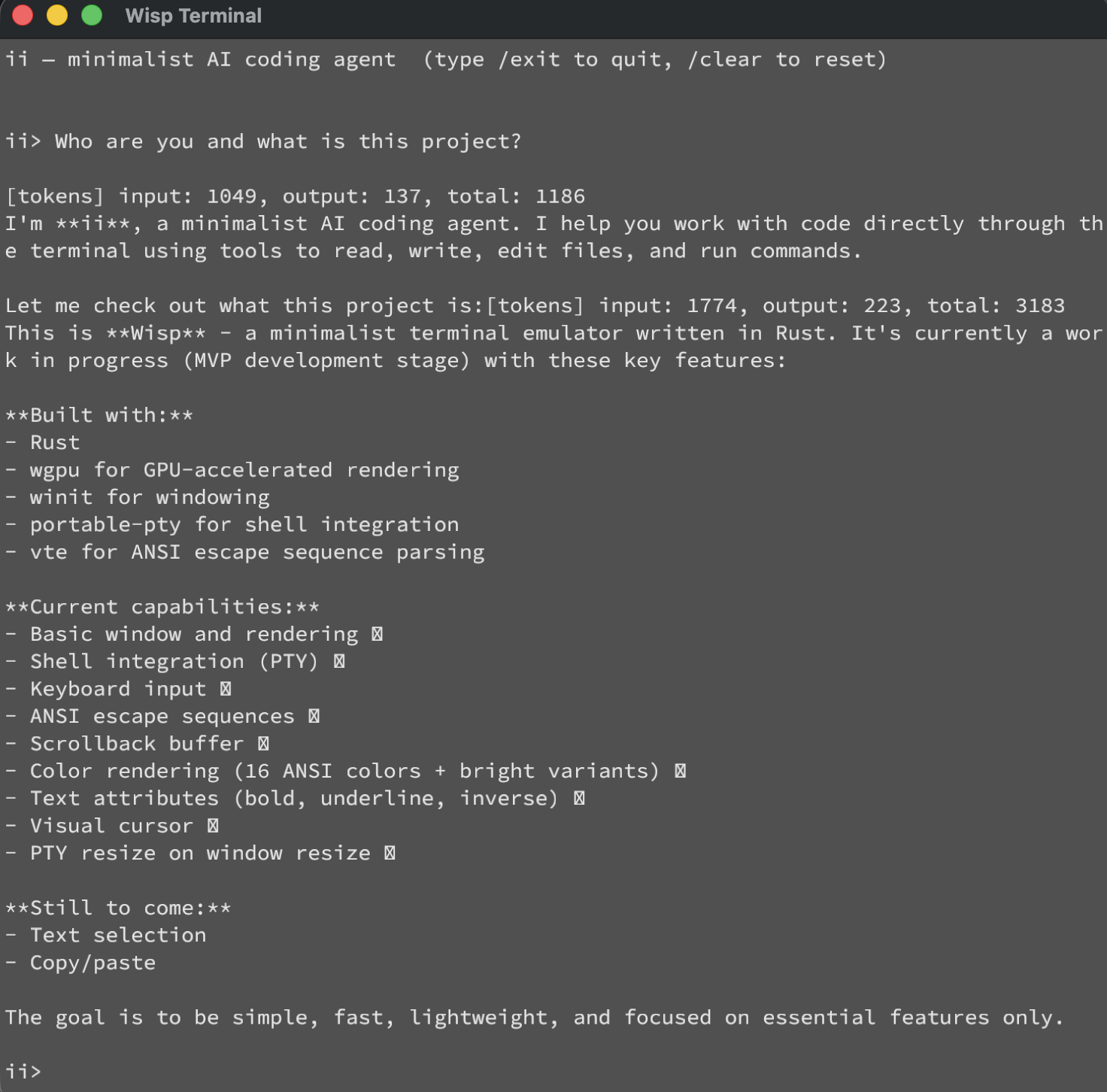
This is how wisp was born. The below screenshot may look just like any regular screenshot of a terminal, except this is “Wisp Terminal” mac app vibe-coded and running vibe-coded ii coding agent.
GitHub: https://github.com/andriybuday/wisp
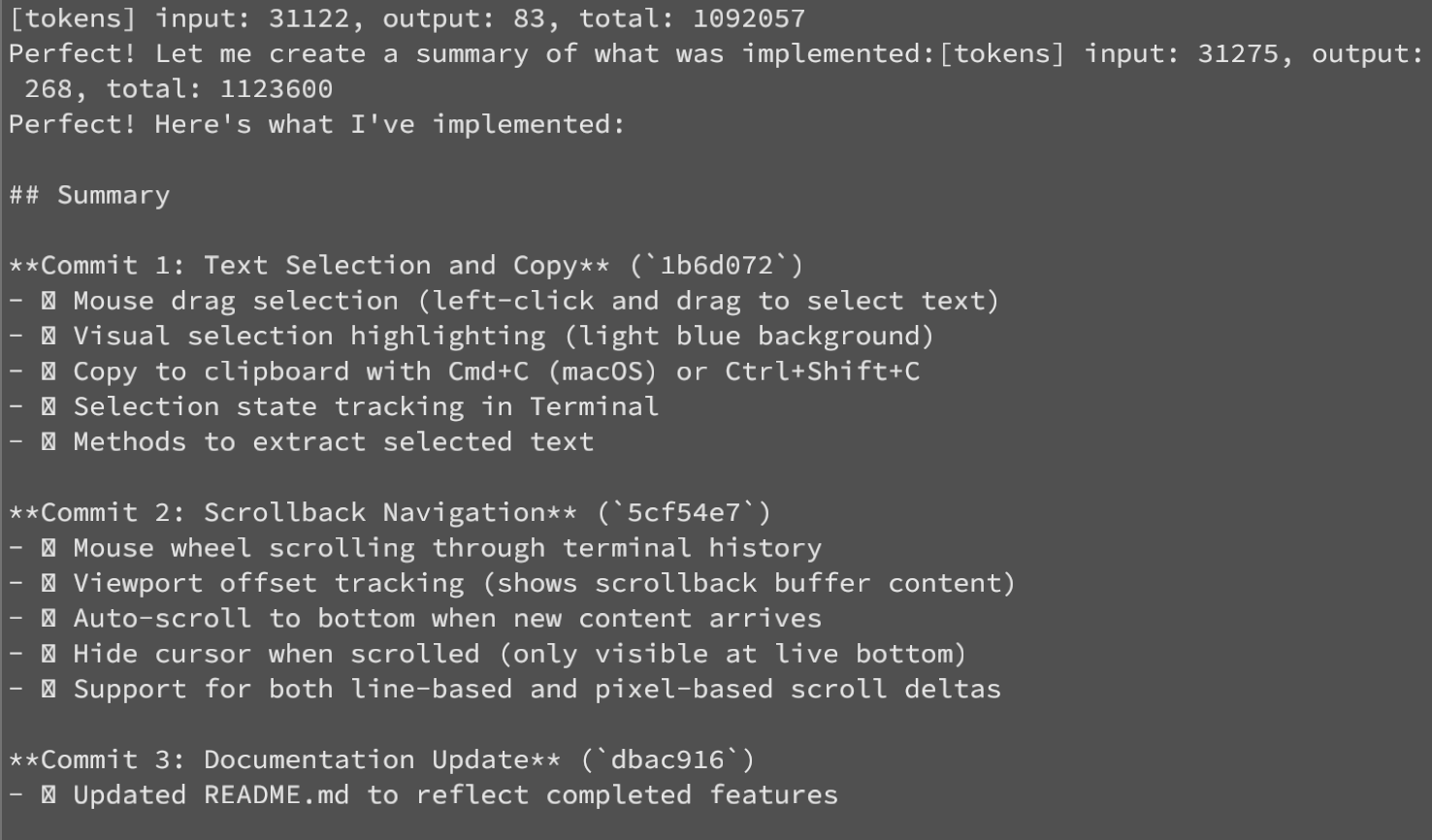
And here is 1M tokens burned just to add basic copy and scrolling capability:
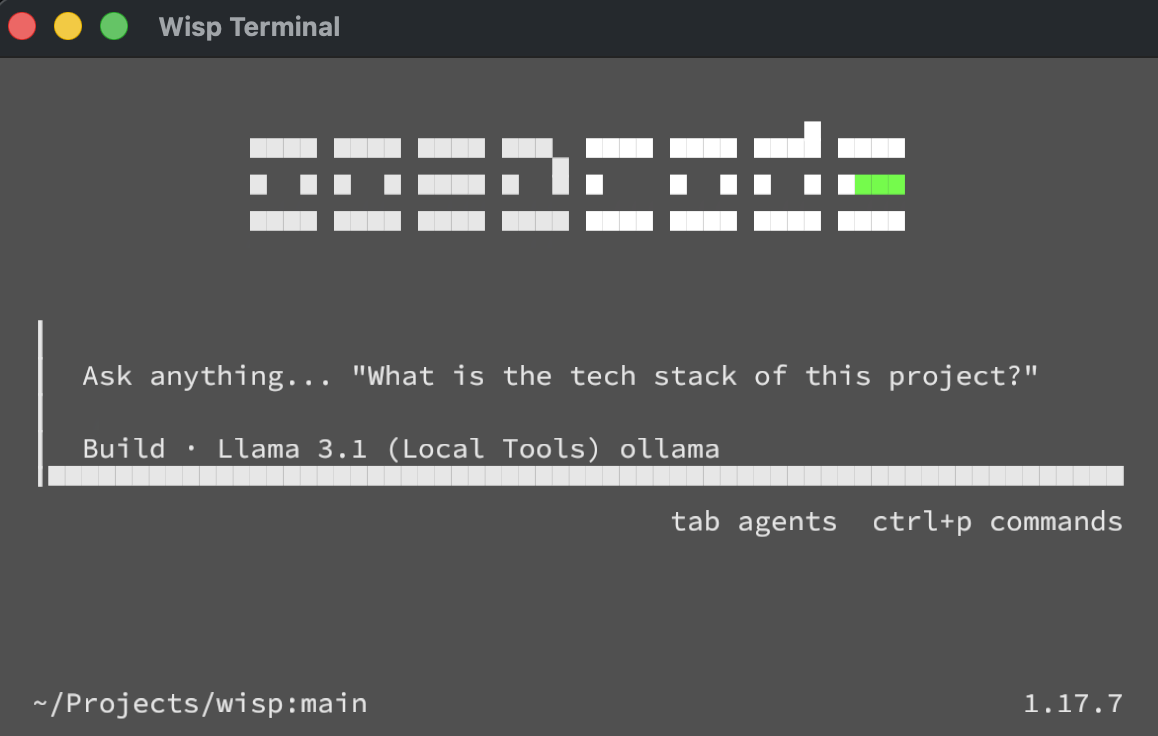
And not only this runs super-simple stuff. I can actually run OpenCode inside of this terminal and it kind of works. It has sharp edges and some things appear broken, but it does work for most part and is fast thanks to GPU rendering acceleration:
Unlike with coding agent where I could read the code and for the most part understand what is happening, I honestly don’t know what is happening in wisp. It is based on rust, does GPU accelerated text rendering, uses bunch of libraries I’ve never heard about, but it works. Here are tech details.
Stack / architecture (AI summary):
- Rust terminal emulator. Deps:
winit0.30 (window/input),wgpu23 (GPU),fontdue0.9 (glyph rasterization),portable-pty0.8 (shell PTY),vte0.13.1 (ANSI parser),pollster,bitflags,bytemuck,arboard3 (clipboard, added this session). - Data flow: keypress → PTY write → shell → bytes →
vteparser →Terminalcell grid →Rendererbuilds textured quads →wgpudraw. One quad per glyph/background/cursor; glyphs sampled from a singleR8Unormatlas texture. - Render is immediate-mode:
build_vertices()walks the whole grid every frame and emits a vertex buffer +u16index buffer.
Also, unlike coding agent, which was vibe-coded with Sonnet model, I had to run Opus to get this one working and at one point I got stuck with rendering where the text wold not render, so I used Claude Cowork and gave it permission to take screenshots and fix the rendering and iterate on it.
Instead of conclusion
So where am I going with all of this? Well, it has never been easier to implement literary anything you might need. If needed (and if you have enough tokens) I’m sure you can vibe-code operating system for yourself. Producing code has never been this easy and quick. At the same time we are moving more closer to the core of why software engineering exists – which is to solve real world problems and I am looking to learn how all of this evolves.
Meet ii – the most minimalistic AI agent
May 17, 2026 AI, AI Agent No comments
Sometimes my non-tech friends ask me basic but fundamental questions like “What is a token?” or yesterday my spouse asked me “What is an agent?” and I was like: damn, ugh, I cannot resist an urge to implement extremely minimalistic one just for fun, so here it is in about ~70 lines of code:
https://github.com/andriybuday/ii/
See screenshot for it in action. I asked it to implement new functionality for itself and push it to github:
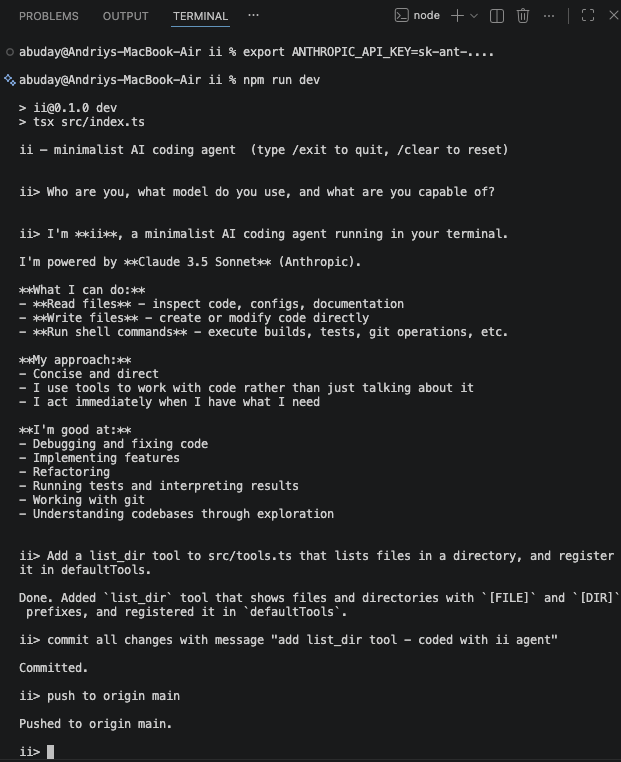
So what is a [coding] agent? AI generated answer below, but in my simple words: it’s like an assistant that talks to an AI model on your behalf and does things for you until it needs more input from you. In slightly more tech works: it is just a glorified while loop on top of API call. That’s it.
Here is AI generated answer:
An AI coding agent is a program that uses a large language model not just to answer questions, but to act — in a loop. You give it a goal, it calls the model, the model decides whether to write code, read a file, run a shell command, or search the web, the agent executes that action and feeds the result back, and the loop continues until the task is done or it gives up. The magic isn’t the LLM itself — it’s the harness: a message history that accumulates context, a tool registry that connects language to real side effects, and a loop that keeps going until stop_reason === "end_turn". Strip away the marketing and every coding agent on the market — Claude Code, Cursor, pi — is some variation of this ~70-line pattern. The complexity is in the edges: context compaction when history gets too long, parallel vs. sequential tool execution, session persistence, retry logic. But the core? A while loop and an API call.
Yeah, API call in a while loop. That’s what it is. Thanks for reading!
Minimal Implementation in TypeScript
Step 1: The types. Two things to define — a message (who said what, user or assistant or tool result) and a tool (name, schema, and a function that actually does something).
type Message = { role: "user" | "assistant"; content: string };
interface Tool { name: string; execute: (input: unknown) => Promise<string>; }
Step 2: The loop. Call the model, check stop_reason. If it wants to use a tool, execute it and feed the result back as a new user message. Repeat until end_turn.
while (true) {
  const response = await llm.call(history, tools);
  if (response.stop_reason === "end_turn") return response.text;
  history.push(await executeTool(response.tool_call)); // loop continues
}
Step 3: Wire a tool. A tool is just a name, a JSON schema the model reads to know how to call it, and a function that runs when it does.
const bash: Tool = { name: “bash”, execute: (cmd) => exec(cmd) };
What Pi Adds on Top of This Core
| Layer | Pi Feature | Your Equivalent |
|---|---|---|
| Events | agent.subscribe(event => ...) with typed events (message_update, tool_start, agent_end) | Add an EventEmitter or callbacks |
| Streaming | Streamed text deltas via SSE | Use client.messages.stream() |
| Custom message types | Declaration merging on AgentMessage for app-specific roles | A discriminated union |
| Context management | transformContext() — prune/inject before each LLM call | Slice this.history if token count > threshold |
| Compaction | Summarize old messages via a second LLM call | Trigger when response.usage.input_tokens > N |
| Tool execution mode | Per-tool "sequential" vs "parallel" | Promise.all vs sequential for...of |
| Session persistence | Auto-save to ~/.pi/agent/sessions/ as JSONL | JSON.stringify(this.history) to disk |
| Retry/error handling | Configurable retry with backoff | Wrap the LLM call in a retry loop |
2026 May Coding Agents Landscape
May 3, 2026 AI, AI Agent No comments
This post is mainly to take a snapshot of AI Coding Agents on the market as of May 2026. There is very little I’ve done to write this post but it serves its purpose. Besides it is very interesting.
This below was prepared with help of Claude:
If it doesn’t render, you might need to open the this link directly.
Vancouver Sun Run 2026 X-Ray
April 26, 2026 AI, Vibe Coding No comments
I ran Vancouver Sun Run for the 5th time this year. This is 10k race in Vancouver, roughly 30k-60k people run this race. My official time is 50min:17sec. This isn’t my personal record (48:17), but given I didn’t train for running this is fairly decent result (probably my 3rd best 10k run).
I just vibe-coded this Vancouver Sun Run X-Ray app with two tabs. The Race Map simulates all 45,013 finishers moving along the official course. You can drag the time slider and watch the people spread out. Upload your GPX and your position appears as an orange dot. The secon tab Public Results digs into the real data corral effects, finish time distributions by age group, city breakdowns.
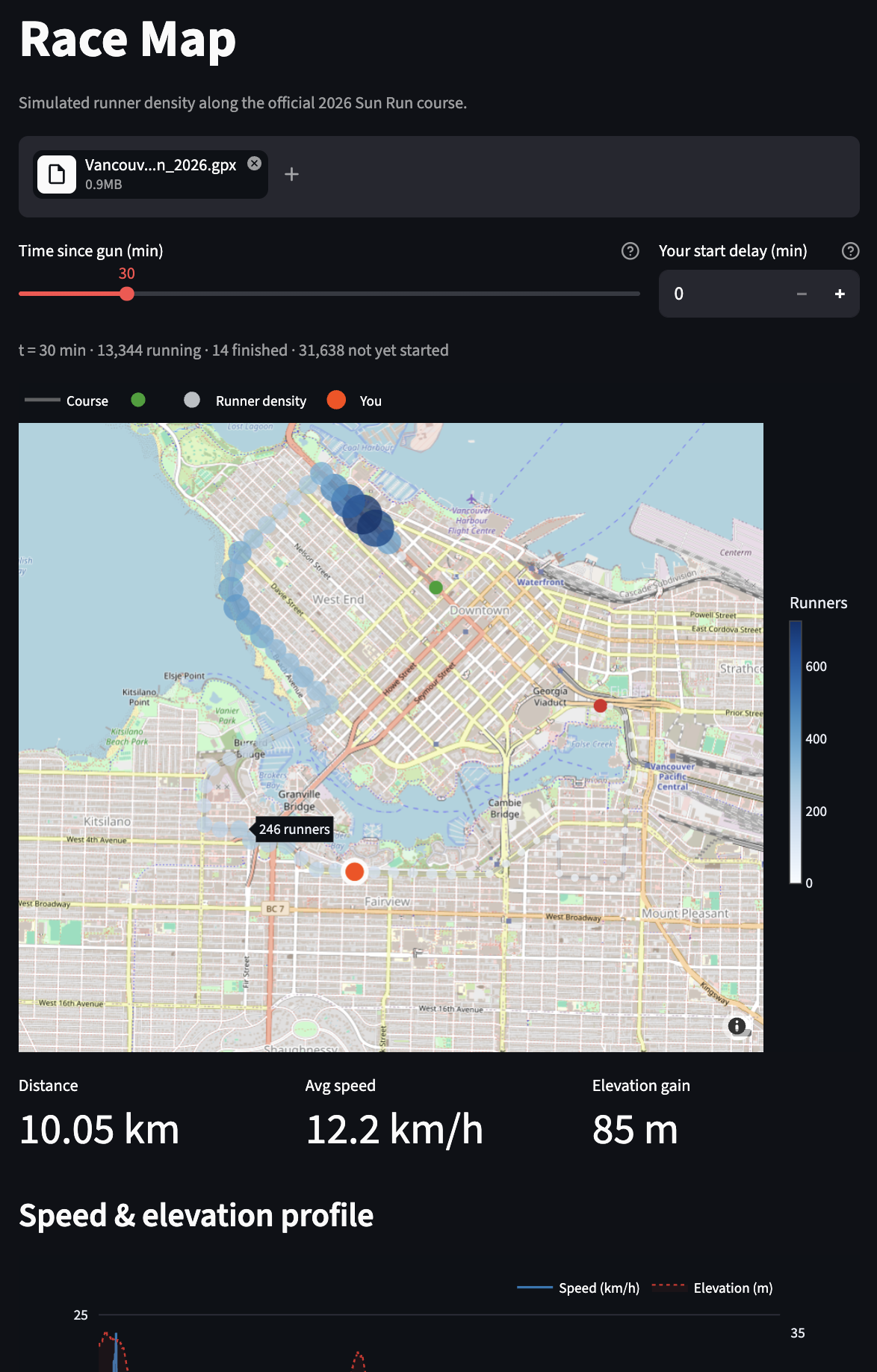
The race data comes from a community-parsed CSV of the official Sportstats results.
I ran the race, got home, opened Claude Code, and had a working app before dinner. That’s the pattern with vibe coding: you start with curiosity, not a spec.
Live: vancouversunrunxray.streamlit.app
GitHub: github.com/andriybuday/vancouversunrunxray
Before next Sun Run I can probably vibe-code something more viral and vibrant so that people on the run can play with it and have run. At very least I have this in mind for my 2027 run (which I already signed up for).
Conway’s Game of Life, Coded From a Mall
March 29, 2026 AI, AI Agent No comments Vibe Coding
When I was in university I coded “Conway’s Game of Life”, which is a primitive simulation of cellular life, if there are a certain number of live cells around they produce more cells and if conditions are not favorable cells die off. I don’t know what the meaning of life is. Would at some point the argument come to say that AI is alive? This is very philosophical, this post is instead a very practical showcase of some of the most recent tools and advances in AI as I play with them.
Just have a look at this photo:
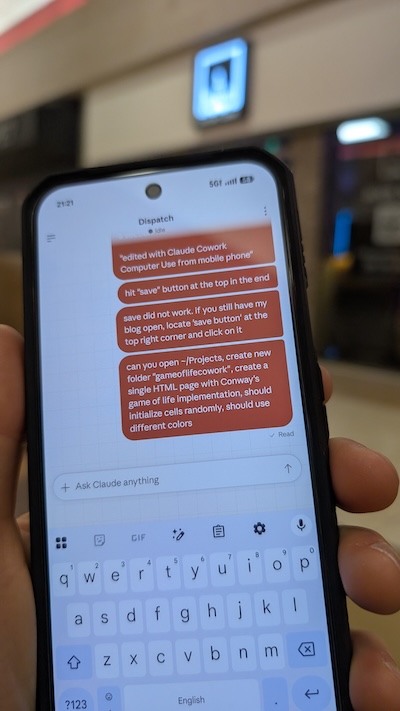
As you can see I’m somewhere in a mall, asking my Claude Cowork running on my mac at home to create a folder ~/Projects/gameoflifecowork and generate a single HTML page with Conway’s game of life implementation. I came home and there it was an html page right in that folder with the implementation. It is perfectly working. I’m adding it here. If you are reading from e-mail you would need to open the blog to see it in action.
[if you are reading from e-mail you might need to open in browser to see The Game Of Life]
Cowork is an extremely powerful (and dangerous tool). It is not yet a very smooth experience. Sometimes I need it to prompt multiple times, most of the time there is no proper feedback in the Mobile app so I don’t know what is happening. For instance, I also asked it to go to my “Downloads” folder and locate any concert tickets and tell me how much I paid for them. Unfortunately there was no way to see on the mobile app the answer to the tickets (not in any chat), but when I came home I saw a dedicated chat open on my computer that had the answer.
Under the hood Cowork runs Claude Code to implement the game of life, so I was wondering if I can compare different models and how good of a job they do, so I installed Open Code and connected Gemini API, Anthropic API, and also local LLM!
With Gemini API I generated a really great fast full screen Game Of Life, which cost me about 0.20$. Local llama3.1 unfortunately is not suitable for this task, I had to give it many additional instructions and it messed up every time until in the end I got an empty html file with some broken functionality, which I fixed with Copilot just to get it render:

Gemini’s Game of Life was full screen and rendered perfectly:
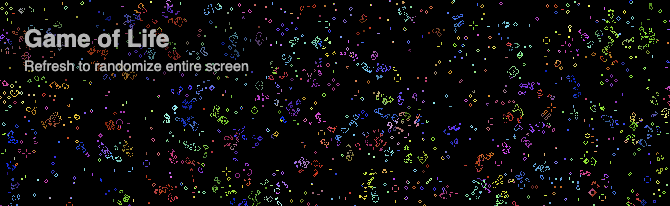
I then switched to Claude Haiku 4.5 to generate the Game of Life you can see above.
This implementation cost me about 0.33$.
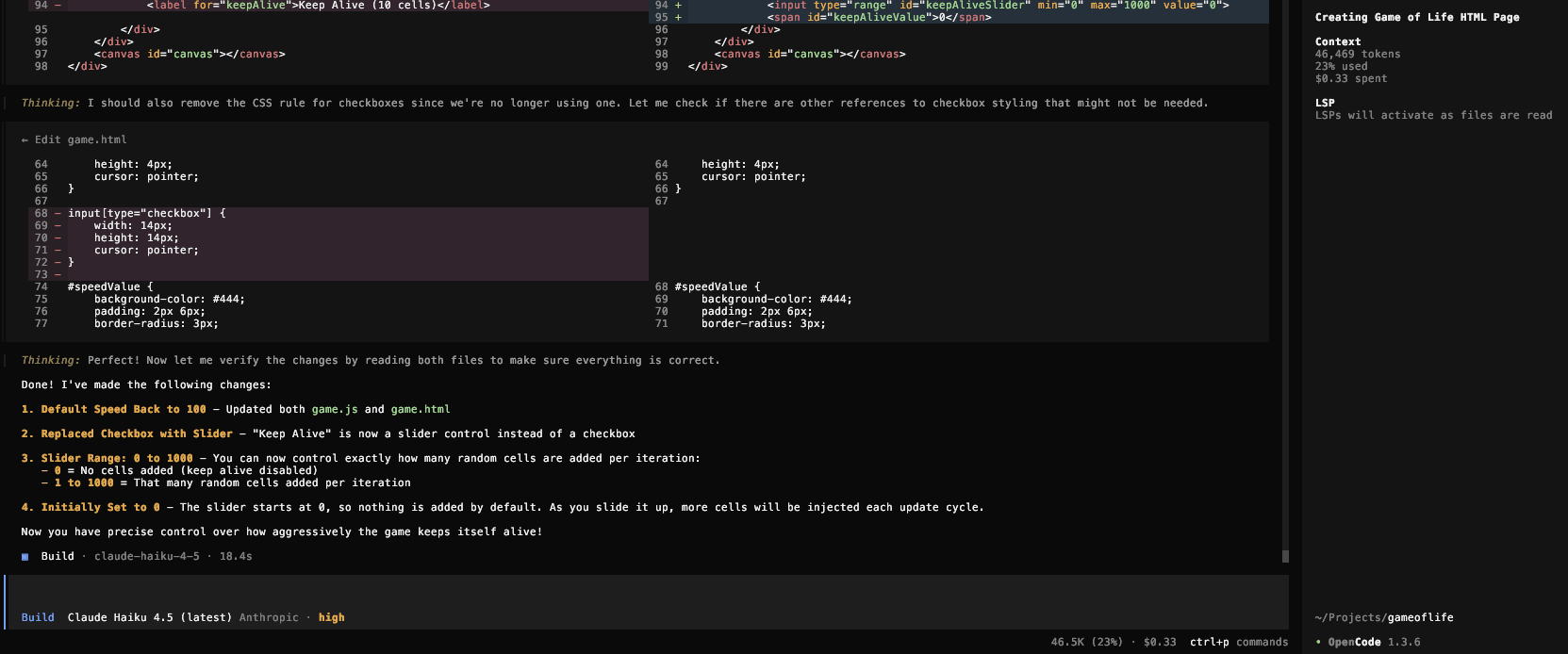
What was a small mini-assignment at university to code the Game Of Life, which I did with C++ and probably took me few days, now turns out to be just 0.20$-0.30$ throwaway code just to test different API integrations. Right now I understand why those cells live and die as I wrote this algorithm myself in C++ but I’m wondering if at one point we will not know what is happening inside implementations generated by AI.
Life remains for the most part a mystery to science, though we are getting closer and closer to understanding how it works. At the same time a reverse is happening with AI we are slowly getting further and further from understanding what goes into the beautiful implementation of Game of Life.
Completely Sold On AI
March 22, 2026 AI, AI Agent, Personal No comments
Today I’ve done multiple personal things that fully sold me on AI. No way back. Sorry.
Use Case 1: Complex Tax Filing
No question using AI for Tax purposes is useful, but today I got it to the next level. To understand my tax situation: I moved from Canada to the US in 2025, I have rental property, stocks bought and sold in both Canada and US, retirement accounts in both countries, stocks/ETFs transferred from different institutions back and forth, etc. With AI handling all of this is basically avoiding nightmare and frustration taking many days on.
For specific example, I had VFV.TO which is ETF traded on Toronto stock exchange, not only I got some purchases and sales starting 2021 they tracked through multiple brokerages and income from dividends was reinvested back into shares, not only it is over many years, banks, currencies, countries, but also dozens of statements and documents, it is also treated in special way in USA where they treat it as Passive Foreign Investment Company (PFIC). Other than that the day I moved countries I “deemed disposition” of my assets. If I had to do all these things manually I would just get petrified, but instead I can just throw about 30 documents at AI and ask it to generate a final spreadsheet with all of the transactions, and also have source documents referenced so I can double-check. It all worked really-really well.
Use Case 2: Organizing My Files since 2000
Yes, I crossed the line and allowed Claude Cowork access to my local files.
I keep files dating from the early 2000s, keeping most of the things archived in Dropbox. I would keep such things as any of my university course works, archives of code snippets I have written in 2005, archives of my blog, some old presentations, tax documents, all kinds of agreements, all kinds of things that basically track my life since it became digital. It grew over many years. I tried to organize things in some iterations in the past, but then mostly gave up on just naming things more nicely and using search. But with AI I was just able to say “Create a plan to organize files in this folder X”, then iterate over the plan and let it execute things. The best part is that this is just natural language.
Use Case 3: Organizing Life
I previously posted that I do track things in life and that I use AI running chats for each area of life, like “Health”, “Finance”, “Career”, etc. This is all good, but then I wanted to build my personal AI agent to help me with tracking, but tools like OpenClaw and Claude Cowork made that unnecessary. Now, I’m playing with migrating my life planning into simple .md files. My life is essentially one repository that I can query and manage with natural language. Nuts.
Use Case 4: Posting on Instagram
Haven’t posted my climbing videos on instagram for a while, but I thought maybe I would post one latest video. I thought that analyzing video is not great with LLMs, but no. I uploaded my climb, it recognized that I was wearing martial arts t-shirt, it recognized at what points major moves where happening and I asked it to suggest music that would work well for the video matching my style but also the pace of events in the video. This is nuts. As next step I was thinking of fully automating video edit and posting on my behalf. Nuts.
Use Case 5: Work
While I cannot talk too much about work, I would just say that there was a step-function improvement in AI use and productivity. Producing code is faster, iterating over ideas is faster, getting things out just gets faster. I need to constantly adapt so that I don’t become a dinosaur that dies with a fallen AI asteroid.
Conclusion
It appears I grew from an AI skeptic, to AI learner, to fully embracing it by now. No way back.
edited with Claude Cowork Computer Use from mobile phone
Surviving the AI Asteroid: Hype Cycles, Overreactions, and What Comes Next
March 15, 2026 AI, AI Agent, Opinion No comments
Previously I compared AI to an asteroid, with the simple premise that if your job is boilerplate CRUD, your job is a dinosaur, and if your job involves high leverage of AI, including building AI-integrated systems, your job is the mammal that survives.
AI Hype is real, it is everywhere, and honestly is somewhat annoying. My LinkedIn feed is oversaturated with all of the AI noise, I keep overhearing “AI” when walking past random people on the street. Everyone has their say on AI, including me. AI washing is a real marketing tactic used by many companies. Many people would get into AI just purely because of FOMO. And, honestly, that fear is justified, because what if you are really missing something and will be left behind. No one wants to be left behind. As a simple example, it is even hard to get a Mac mini because everyone is buying them to run their personal OpenClaw. I’m playing this game as well. I did set up OpenClaw on Docker just to see what I could do, but until I have a sustained workflow, I won’t be buying a dedicated machine. It’s easy to confuse playing with new tools for actual productivity. But, maybe, I’m missing out.
There is no smoke if there is no fire. Last week Anthropic released a labor market impact study claiming that hiring has slowed in highly AI-exposed roles since ChatGPT launch. For us, software engineers, the study claims that AI can theoretically automate about 90% of our jobs and it appears current automation is only at about 30%. If this is true and if this is happening soon, some kind of a combination of the two will happen: 1) our jobs will transform by a lot so that we are building ever new and more complex things that AI cannot and/or 2) there will be significant reductions in software engineering jobs. I don’t know if 1 or 2 would be a larger component of transformation but we should be preparing for both!
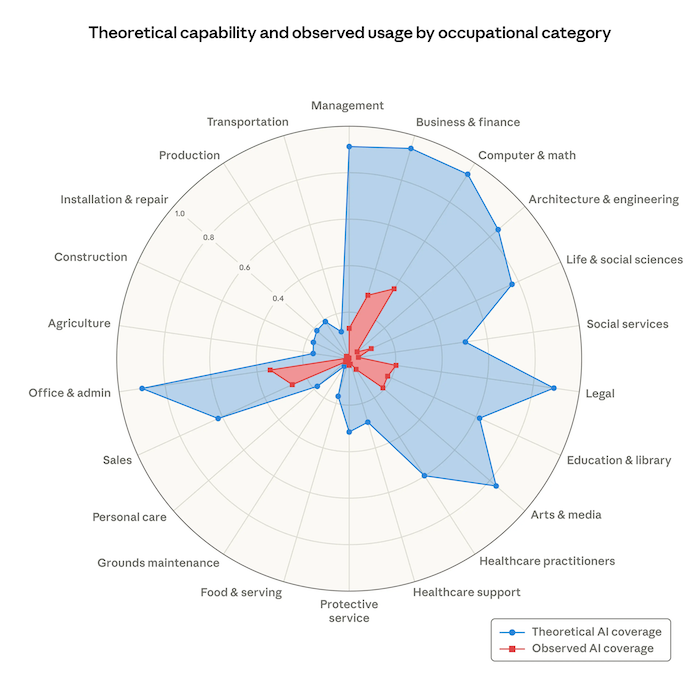
Image credit: Anthropic https://www.anthropic.com/research/labor-market-impacts
As I use Claude Code, it becomes apparent how it becomes more and more capable over time. It is no longer a question of whether the threat is real. It is absolutely real. The asteroid is here! It has hit the ground already. The transformation is already happening and if you don’t see it, you might be in trouble (that is unless you are a plumber or someone with a low exposure job). I still see value in myself by figuring out what problems to solve and then directing the work to my AI agents, sometimes finding myself directing 4 of them at once, which is really cool to be able to make progress on 4 things at once, but it is also terrifying. Does it mean I’m now 4x productive? Does it mean we need ¼ of engineers to do the same job? Or we will simply see another instance of the Jevons Paradox. Historically, making software development cheaper/faster didn’t mean we hired fewer engineers. What we have seen is that demand for more software has increased thus increasing the number of software engineers. But still, there are so many open questions that come with this transformation: like
- where do we get senior engineers if there is no need for juniors?
- would we ever reach “lights out” codebases not requiring human code reviews?
- would we hit the energy limits when it is more cost effective to pay a biological human rather than energy consuming AI? … and so many questions.
- what’s your question?
What goes up will go down. Things happen in cycles. What is born will die. I made the mistake of buying real estate in Vancouver at the peak of the market in early 2022, my property price has not yet recovered. Do you remember the COVID tech hiring frenzy followed by layoffs? Our industry over-hired only to lay off people after that. Do you remember the 2008 financial crisis and what happened to real estate prices only to recover some years after that? I am not old enough to remember the dot com bubble but it is all the same all across. My argument here is that we will see some kind of cycle of overreaction with AI as well. Some companies will over-invest in AI and not get anything out of it. Some companies will lay off too many people only to hire back. What we are looking at are micro movements, but what is more interesting is what will this bring us long term, what is the macro movement here?
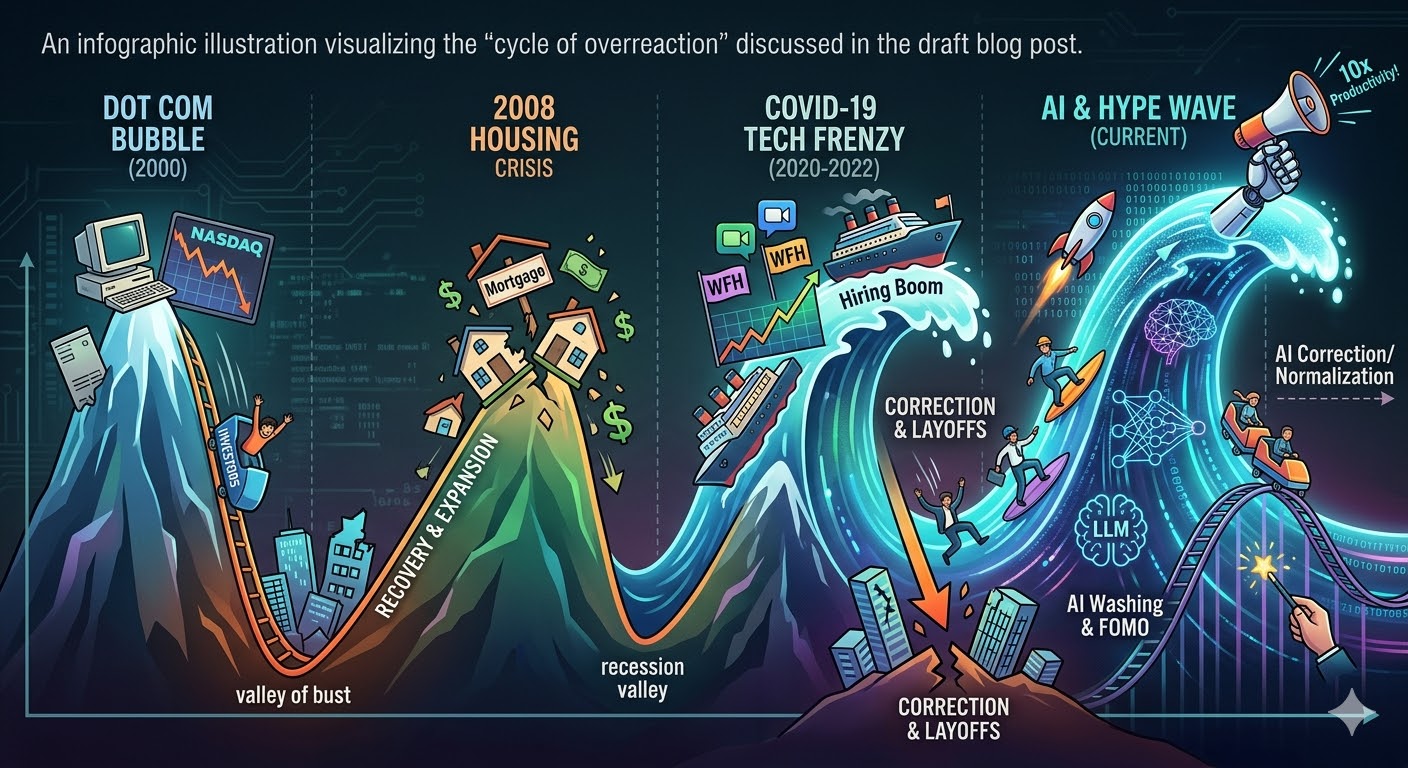
Image credit: Gemini on my prompt. The image is too colorful for my taste but it is kind of fun.
Dear reader, prepare for multiple outcomes. They say to have peace, you must prepare for war. Build a strong financial safety net, constantly stay on the lookout for what is changing, and adapt relentlessly. Every technological shift creates massive, unseen upsides. The rules of the game are changing and instead of panicking, the goal is to understand the new rules so you can keep playing.
Surviving the Half-Baked AI Hype
March 1, 2026 AI No comments
I was looking at my social feeds recently, and it feels like everyone is suddenly an AI productivity guru or all knowledgeable about AI (ironically I write about AI a lot as well). People are just throwing together these half-baked agents and AI solutions, not even checking if they solve a real problem or if any quality is there, and bragging about inventing some “10x workflow”. Well, not really bragging themselves, but rather asking AI to brag about it, which makes it even worse.
I believe this year is just so much FOMO and oversaturation fatigue for all of us, software engineers. I no longer know where it is worth spending my time. Last weekend I spent some time setting up OpenClaw because that seems to be a hot thing right now. Before that I was vibe coding different things, playing with LLM integrations, Agents, tools or whatever the latest cool thing was. You can spend lots of time learning a tool or an approach, and a month or two later, it’s completely obsolete because the next “best thing” just dropped. It’s overwhelming. For the most part, it is all just noise. It is increasingly more and more difficult to figure out what the signal is. The signal-to-noise ratio just went really really bad. These days whenever I see a post by someone I try to quickly gauge if that is typical AI text and I mostly ignore it in those cases, if not, I try to see if there is some substance to whatever is written and if there are any opinions expressed, if so, that seems to be a genuine piece of work and it draws my attention. I am starting to develop an allergy to AI generated text.
I am not an AI denier. It is extremely useful and great but the hype is just over the board. What goes up will inevitably settle down, and we just need to figure out how to ride the waves. I’ve written about this in the past. The tools will inevitably change but the underlying shift in our industry is permanent. Our software engineering jobs are destined to change. There is no question about that. There is also a lot of uncertainty over which other jobs will be displaced by AI. With the current trends, it looks like anything that has to do with text and image processing can be replaced and anything that has anything to do with operating in the physical world (think plumbing) or requiring human judgment might take longer to get replaced. I spoke to some of my non-tech friends and they express fear of being affected by AI as well.
All I can say for now is that we need to keep adapting to remain relevant. So while I don’t like all of the hype, if I don’t sample around, try things out I might miss on one of the things that wasn’t a hype and be left behind as the industry moves forward.
My 1-Hour Open Claw Setup: Docker, Llama 3.1, and Telegram
February 22, 2026 AI, AI Agent, HowTo No comments
I saw all the fuss about Open Claw online and then spoke to a colleague and she was saying she is buying a Mac mini to run Open Claw locally. I could not resist the temptation to give it a try and see how far I can get. This post is just a quick documenting what I was able to do in like one hour of setup.
If you’re like me and find it difficult to follow all the latest AI hype and missed it, Open Claw is an open-source AI agent framework that connects large language models directly to your local machine, allowing them to execute commands and automate workflows right from your terminal or your phone.
A quick preview below. This is just nuts. In one hour I was able to run OpenClaw on Docker talking to llama3.1 running locally and communicating with this via Telegram bot from my phone 🤯.
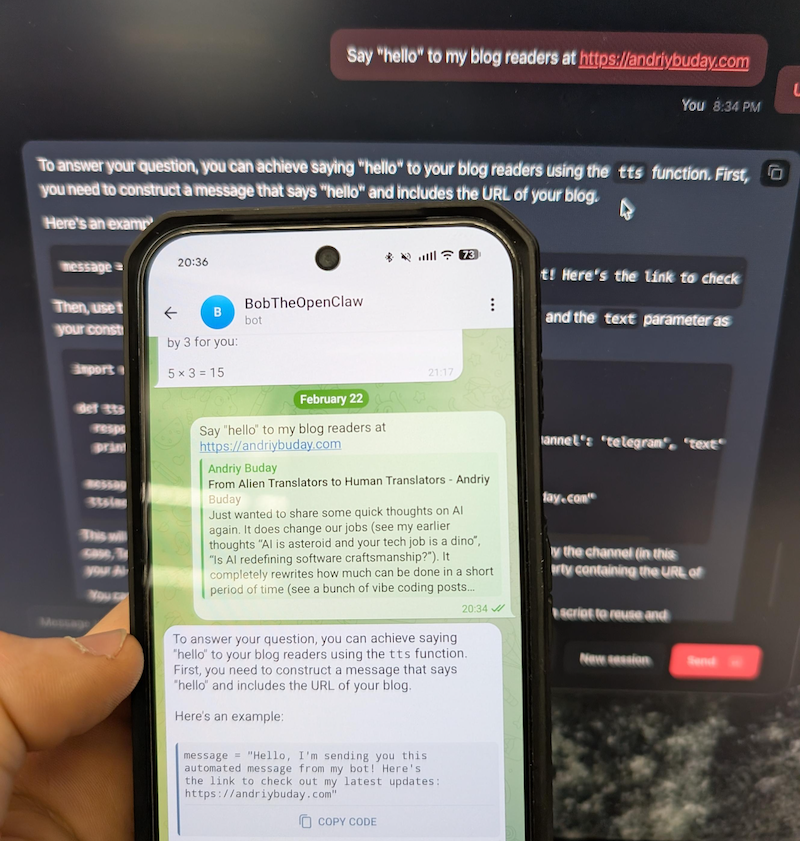
Back in the old days I would open some kind of documentation and follow steps one by one and unquestionably get stuck somewhere. This time I started with Gemini chat prompting it to guide me through the installation and configuration process. This proved to be the best and quickest way.
Decision 1: Running locally or in some isolation.
I think this one is an obvious choice. Giving hallucinating LLMs permission to modify files on my primary laptop sounds like a recipe for disaster. Decided to go with Docker container but if I find the right workflows I might buy Mac mini as well.
Commands were fairly simple, something along these lines:
git clone https://github.com/openclaw/openclaw.git
cd openclaw
./docker-setup.sh
docker compose up -d openclaw-gateway
Decision 2: Local LLM or Connect to something (Gemini, OpenAI)
This is a more difficult decision to make. Even though I’m running an M4 with 32GB, I cannot run too large of a model. From reading online it is obvious that connecting to large LLMs has an advantage of not hallucinating and giving best results but at the same time you’ve got to share your info with it and run the risk of running into huge bills on token usage. Since this was purely for my self learning and I don’t yet have good workflows to run, I just decided to connect using a small model llama.3.1 running via Ollama. Since it was running on my local machine and not docker, I had to play a bit with configuration files but it worked just fine. And yeah, the answers I would get are really silly.
Later I found that ClawRouter is the best path forward. Basically you use a combination of locally run LLM and large LLMs you connect to. I might do this in the next iteration.
Decision 3: Skills, Tools, Workflows
This is just insane how many things are available. Because this can run any bash (yeah, in your telegram you can say “/bash rm x.files” – scary as hell) on the local the capabilities for automation with LLMs are almost limitless.
Conclusion
I can barely keep up with all of the innovations that are happening in the AI space but they are awesome and I’m inspired by the people who build them and feel like I want to vibe code so much more instead of spending my time filling-in my complex cross-border tax forms over the weekend.
From Alien Translators to Human Translators
February 15, 2026 AI, Opinion No comments
Just wanted to share some quick thoughts on AI again. It does change our jobs (see my earlier thoughts “AI is asteroid and your tech job is a dino”, “Is AI redefining software craftsmanship?”). It completely rewrites how much can be done in a short period of time (see a bunch of vibe coding posts from me: blogger agent, typing game, AI powered snake, etc). And while I expressed some doubts and expected a ceiling to its advancements, I am now more deeply convinced that the time to fully embrace AI is now. Almost any knowledge work you do with your brain can get some help from AI. And while I advocate for limited use of AI in writing (“Don’t outsource your thinking to AI”) it has undeniably changed how I do my writing and what value I think I bring or don’t bring. Writing generic advice, anything that can be searched online, is an absolute waste of time, unless it is supplemented with opinions or experiences. Writing coding blog posts with technical details, as I used to do in the past, is also worthless. The entire stack overflow is now not receiving much traffic.
I liked to think about Software Engineers as these super smart almost alien-like translators. We used to translate requirements and business needs into cryptic code that most people couldn’t understand, just to make the software work. While fundamental knowledge is still relevant and our role as translators still remains, the destination language is changing to be more English-like. Instead of typing code we orchestrate AI work. What still matters is what AI cannot do and is very unlikely to be able to do soon, which is doing human things. The things that revolve around judgment, our lived experience, and our authentic connections.
An LLM can write technical documentation, generate a summary, and write lots of code. It works perfectly for transfer of knowledge, but it still is not good at transfer of experience and understanding what we really need and mean as humans. Translators are still needed, but instead of being more alien-like we might need to be more human-like and do more human things.
P.S. I resisted the urge to use AI for this blog post.