Sometimes my non-tech friends ask me basic but fundamental questions like “What is a token?” or yesterday my spouse asked me “What is an agent?” and I was like: damn, ugh, I cannot resist an urge to implement extremely minimalistic one just for fun, so here it is in about ~70 lines of code:
https://github.com/andriybuday/ii/
See screenshot for it in action. I asked it to implement new functionality for itself and push it to github:
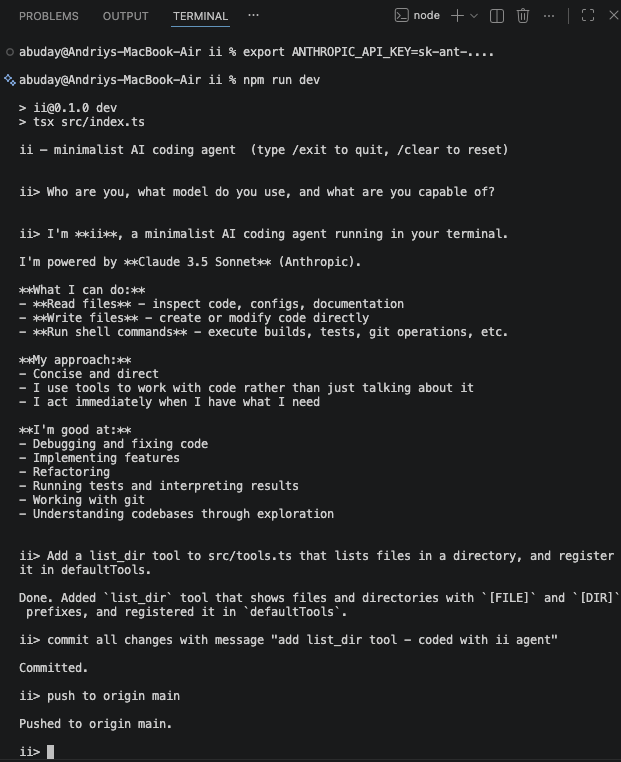
So what is a [coding] agent? AI generated answer below, but in my simple words: it’s like an assistant that talks to an AI model on your behalf and does things for you until it needs more input from you. In slightly more tech works: it is just a glorified while loop on top of API call. That’s it.
Here is AI generated answer:
An AI coding agent is a program that uses a large language model not just to answer questions, but to act — in a loop. You give it a goal, it calls the model, the model decides whether to write code, read a file, run a shell command, or search the web, the agent executes that action and feeds the result back, and the loop continues until the task is done or it gives up. The magic isn’t the LLM itself — it’s the harness: a message history that accumulates context, a tool registry that connects language to real side effects, and a loop that keeps going until stop_reason === "end_turn". Strip away the marketing and every coding agent on the market — Claude Code, Cursor, pi — is some variation of this ~70-line pattern. The complexity is in the edges: context compaction when history gets too long, parallel vs. sequential tool execution, session persistence, retry logic. But the core? A while loop and an API call.
Yeah, API call in a while loop. That’s what it is. Thanks for reading!
Minimal Implementation in TypeScript
Step 1: The types. Two things to define — a message (who said what, user or assistant or tool result) and a tool (name, schema, and a function that actually does something).
type Message = { role: "user" | "assistant"; content: string };
interface Tool { name: string; execute: (input: unknown) => Promise<string>; }
Step 2: The loop. Call the model, check stop_reason. If it wants to use a tool, execute it and feed the result back as a new user message. Repeat until end_turn.
while (true) {
  const response = await llm.call(history, tools);
  if (response.stop_reason === "end_turn") return response.text;
  history.push(await executeTool(response.tool_call)); // loop continues
}
Step 3: Wire a tool. A tool is just a name, a JSON schema the model reads to know how to call it, and a function that runs when it does.
const bash: Tool = { name: “bash”, execute: (cmd) => exec(cmd) };
What Pi Adds on Top of This Core
| Layer | Pi Feature | Your Equivalent |
|---|---|---|
| Events | agent.subscribe(event => ...) with typed events (message_update, tool_start, agent_end) | Add an EventEmitter or callbacks |
| Streaming | Streamed text deltas via SSE | Use client.messages.stream() |
| Custom message types | Declaration merging on AgentMessage for app-specific roles | A discriminated union |
| Context management | transformContext() — prune/inject before each LLM call | Slice this.history if token count > threshold |
| Compaction | Summarize old messages via a second LLM call | Trigger when response.usage.input_tokens > N |
| Tool execution mode | Per-tool "sequential" vs "parallel" | Promise.all vs sequential for...of |
| Session persistence | Auto-save to ~/.pi/agent/sessions/ as JSONL | JSON.stringify(this.history) to disk |
| Retry/error handling | Configurable retry with backoff | Wrap the LLM call in a retry loop |

codemore code
~~~~