I saw all the fuss about Open Claw online and then spoke to a colleague and she was saying she is buying a Mac mini to run Open Claw locally. I could not resist the temptation to give it a try and see how far I can get. This post is just a quick documenting what I was able to do in like one hour of setup.
If you’re like me and find it difficult to follow all the latest AI hype and missed it, Open Claw is an open-source AI agent framework that connects large language models directly to your local machine, allowing them to execute commands and automate workflows right from your terminal or your phone.
A quick preview below. This is just nuts. In one hour I was able to run OpenClaw on Docker talking to llama3.1 running locally and communicating with this via Telegram bot from my phone 🤯.
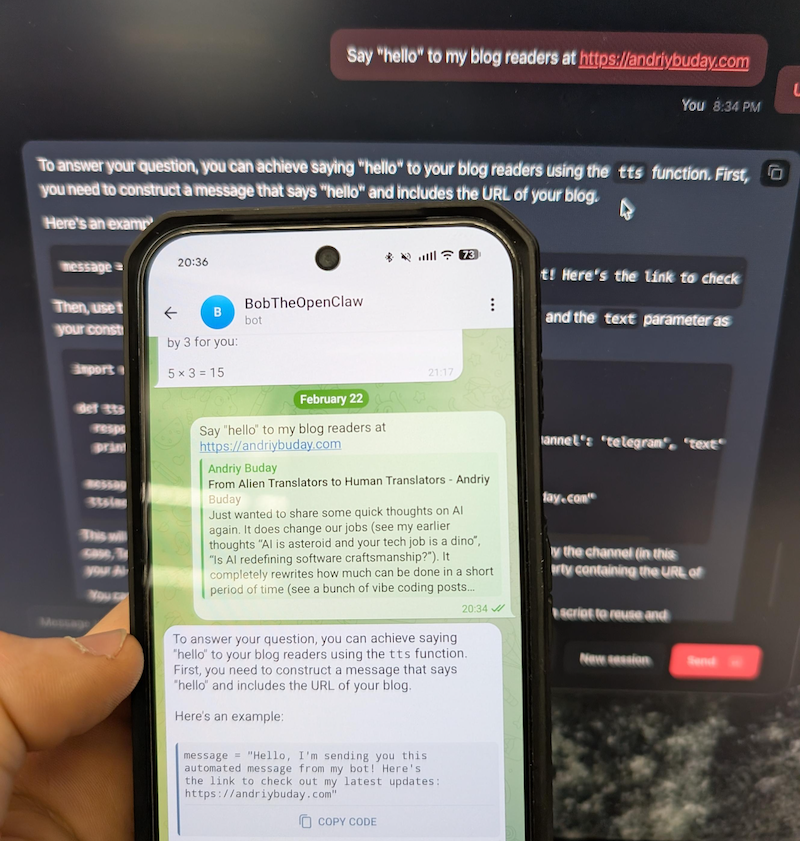
Back in the old days I would open some kind of documentation and follow steps one by one and unquestionably get stuck somewhere. This time I started with Gemini chat prompting it to guide me through the installation and configuration process. This proved to be the best and quickest way.
Decision 1: Running locally or in some isolation.
I think this one is an obvious choice. Giving hallucinating LLMs permission to modify files on my primary laptop sounds like a recipe for disaster. Decided to go with Docker container but if I find the right workflows I might buy Mac mini as well.
Commands were fairly simple, something along these lines:
git clone https://github.com/openclaw/openclaw.git
cd openclaw
./docker-setup.sh
docker compose up -d openclaw-gateway
Decision 2: Local LLM or Connect to something (Gemini, OpenAI)
This is a more difficult decision to make. Even though I’m running an M4 with 32GB, I cannot run too large of a model. From reading online it is obvious that connecting to large LLMs has an advantage of not hallucinating and giving best results but at the same time you’ve got to share your info with it and run the risk of running into huge bills on token usage. Since this was purely for my self learning and I don’t yet have good workflows to run, I just decided to connect using a small model llama.3.1 running via Ollama. Since it was running on my local machine and not docker, I had to play a bit with configuration files but it worked just fine. And yeah, the answers I would get are really silly.
Later I found that ClawRouter is the best path forward. Basically you use a combination of locally run LLM and large LLMs you connect to. I might do this in the next iteration.
Decision 3: Skills, Tools, Workflows
This is just insane how many things are available. Because this can run any bash (yeah, in your telegram you can say “/bash rm x.files” – scary as hell) on the local the capabilities for automation with LLMs are almost limitless.
Conclusion
I can barely keep up with all of the innovations that are happening in the AI space but they are awesome and I’m inspired by the people who build them and feel like I want to vibe code so much more instead of spending my time filling-in my complex cross-border tax forms over the weekend.

codemore code
~~~~